
For the monthly roadmap review
Roadmap slides from Microsoft Planner and Excel, ready for PowerPoint
Pick the Planner plans or the Excel sheet you already keep. Roadmap Slides draws them as a timeline, Now / Next / Later, portfolio status or milestones, and you download slides you can edit in PowerPoint.
Opens on an example roadmap you can edit right away. Sign in with Microsoft or Google when you download. Already have roadmaps? Sign in
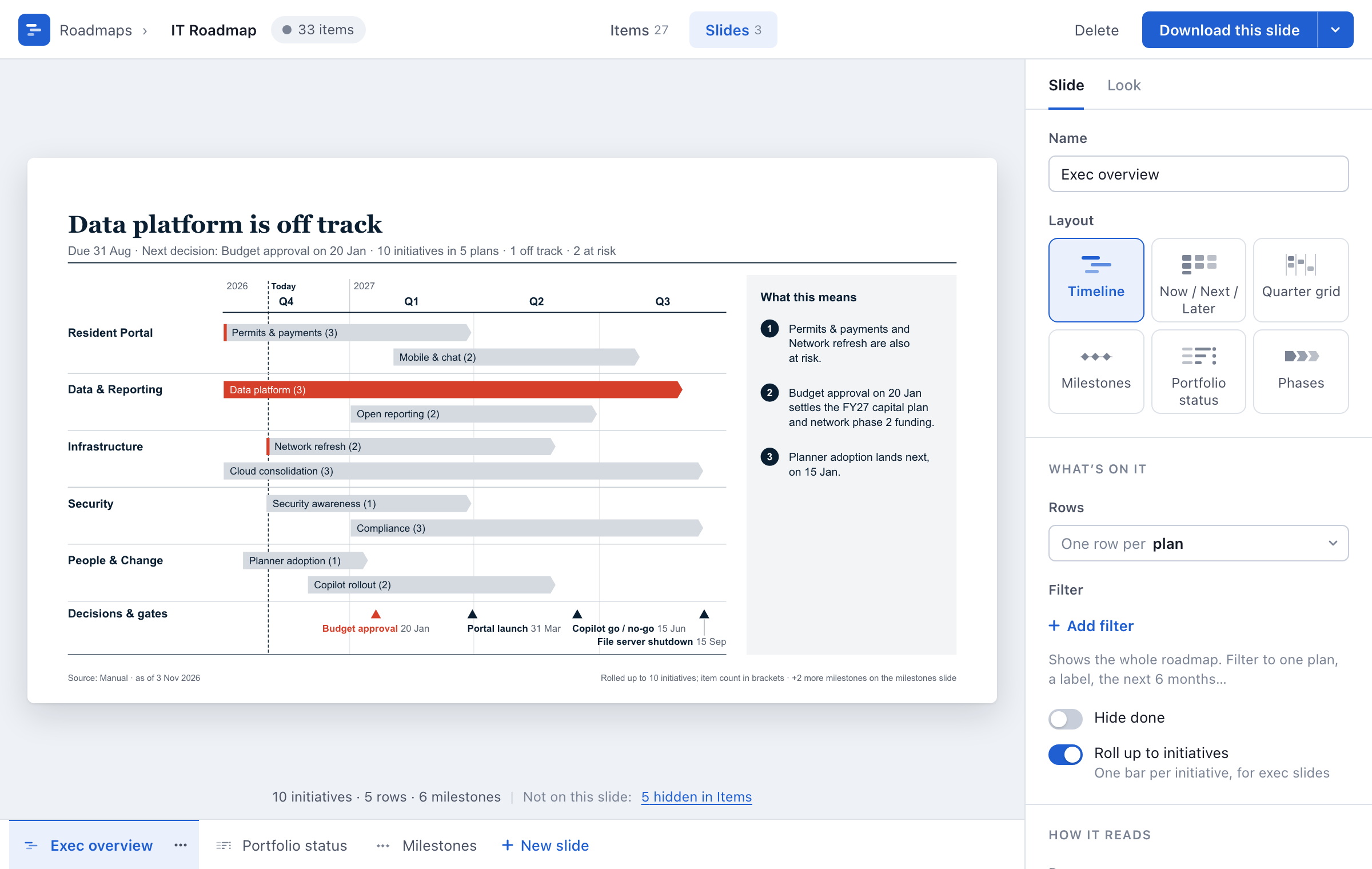
The same deck, every month
The work lives in Planner or a spreadsheet. Leaders read slides. So every month someone copies tasks into PowerPoint, redraws the bars and recolours the status dots, and next month the dates have moved again.
Roadmap Slides reads the plan and draws the slides. You keep the parts only you can write: the headline, the status, what it means.
How it works
From plans to a slide in a few minutes.
- Start from the exampleEdit the example roadmap, type in your own items or import an Excel or CSV file. Or connect Microsoft Planner and tick your plans, basic or premium.
- Shape the slidePick a look, a variant and a layout, then rows, filters and the quarters it covers. Fix titles and statuses in the grid under the slide.
- Download for PowerPointSign in and the slide downloads, built from shapes and text you can edit. Several slides go in one file; a slide also downloads as a PNG.
Six layouts, four variants, four looks
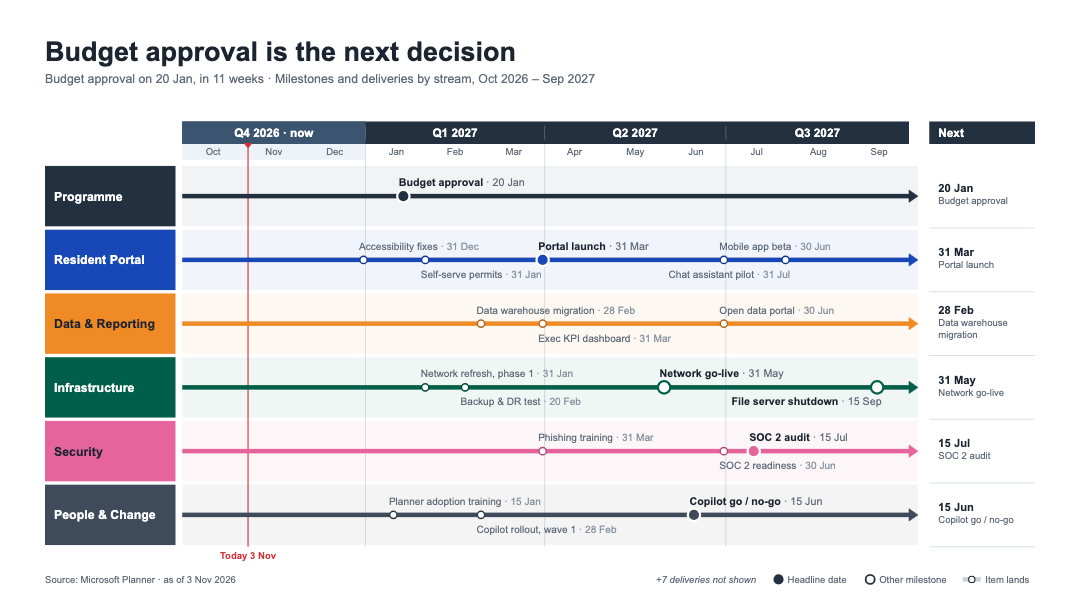
Every slide has its own layout, variant and look. The variant sets what the slide says: one point for execs, every item, outcomes for customers, or a few big headlines. The look sets colour, type and background, from a light board pack to a dark slide for a big screen. Put one look on every slide to keep a deck matching.
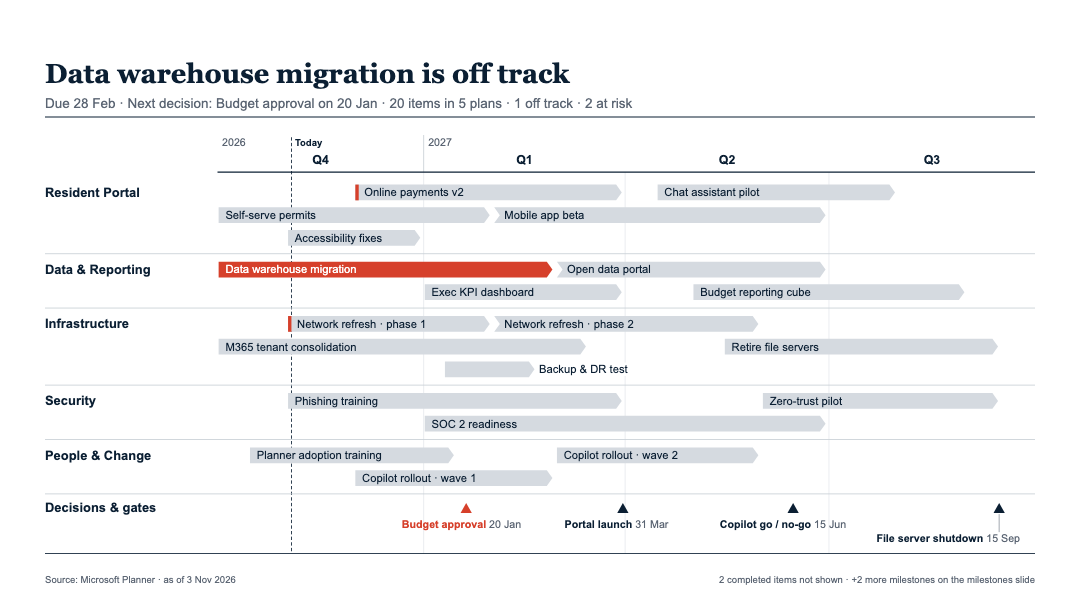
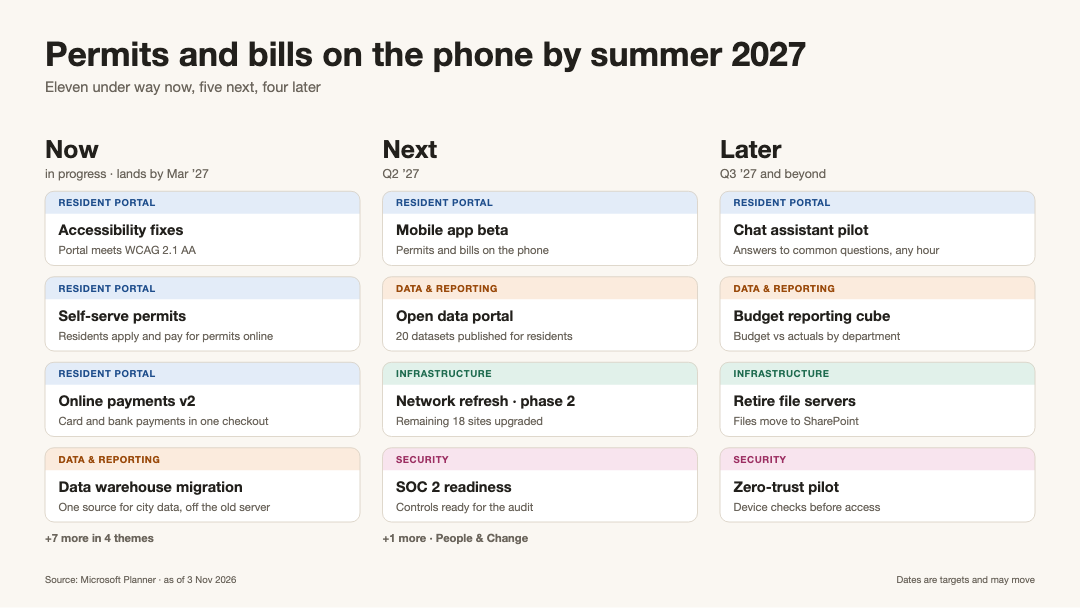
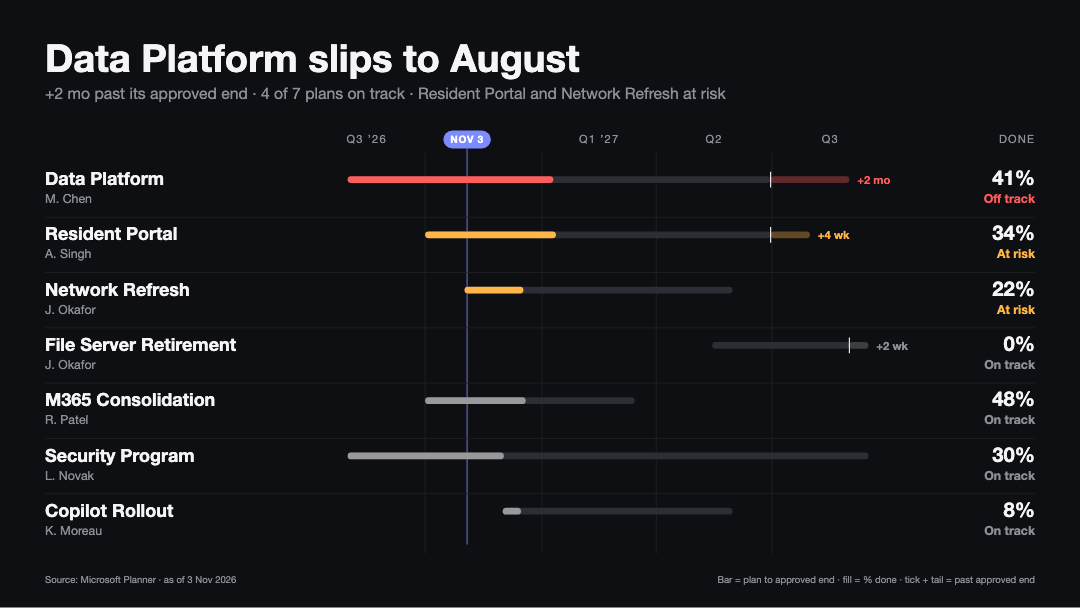
Layouts
- Timeline
- Now / Next / Later
- Quarter grid
- Milestones
- Portfolio status
- Phases
Each slide
Show what this audience needs
- Rows by plan, bucket, initiative or another column
- Filters, the quarters it covers, and done work hidden
- Tasks rolled up into one bar per initiative
- Your own headline, subtitle and "What this means" points
Slides drawn from the sample roadmap that comes with the app.
The grid
Your edits stay
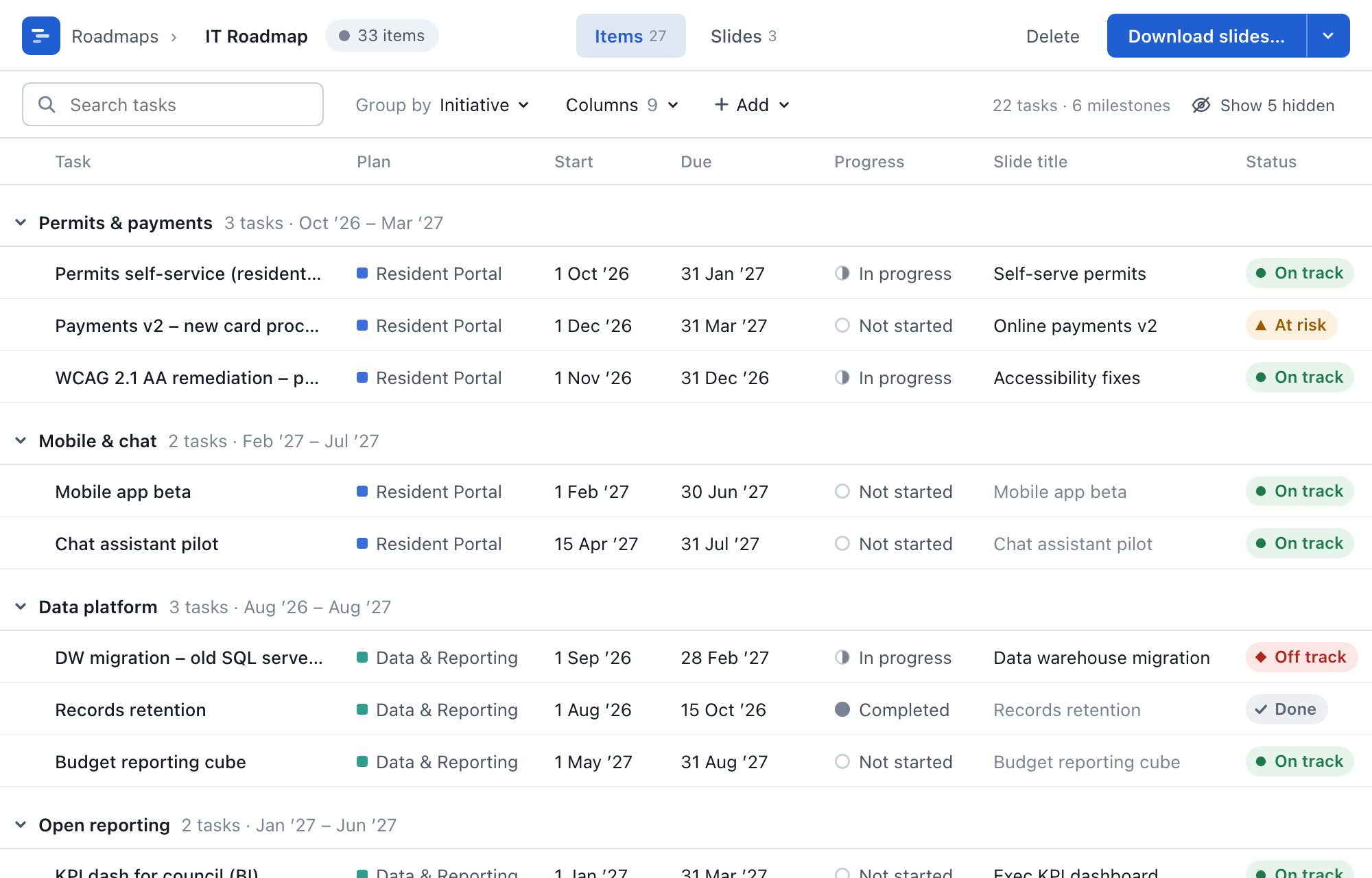
The grid under the slide lists everything on the roadmap, with your own columns beside what Planner holds: a status of On track, At risk, Off track or Done, an initiative, an outcome, and whether it shows on slides. Rename a task or move a date for the slide, and the Planner value stays one click away.
Planner is read again on its own, so dates and progress stay current. Your titles and statuses stay through every refresh. The slide above redraws as you type.
Start from what you already keep
One roadmap, one source. Pick the one that holds your work.
Microsoft Planner
Basic and premium plans, as many as you like on one roadmap. Read-only access to the plans you can already open, read again automatically so the slides stay current.
Excel or CSV
Upload a sheet with one row per item. It is read in your browser and imported once; from then on you edit the roadmap in the app.
Your own items
Start from scratch and add items and milestones yourself. Any roadmap can also take extra items and milestones beside its source.
Start from a template
Each opens in the app with example rows you can overwrite, then downloads as an editable PowerPoint slide.
For whoever presents the roadmap
- PMOs
- Program and portfolio leads
- IT leaders
- Product leaders
- Anyone with a monthly roadmap review
Questions
How do I make a roadmap from Microsoft Planner?
Sign in with your Microsoft work account and tick the plans you want. Roadmap Slides builds a roadmap with one slide to start, an exec overview, and you add more slides when you need them. Change the layout, rows and filters of each slide, then download it for PowerPoint.
Can I see several Planner plans on one roadmap or timeline?
Yes. Tick as many plans as you need when you create the roadmap. Each slide can show one row per plan, bucket, initiative or another column, so several plans read as one portfolio view on one timeline.
Can I put a Planner roadmap in PowerPoint?
Yes. Download one slide, or tick several and get them in one PowerPoint file. The slides are built from native PowerPoint shapes and text, so every bar, label and title stays editable. A slide can also be downloaded as a PNG image.
Can I make a roadmap from an Excel sheet?
Yes. Upload an .xlsx or .csv file with one row per item and at least a name and a due date. Roadmap Slides suggests which column is the title, start, due date, status, group and owner, and you correct any it got wrong. The file is read in your browser and imported once; after that you edit the roadmap in the app.
Does Roadmap Slides change my Planner plans?
No. It asks Microsoft for read access to Planner only, so it cannot create, edit or delete tasks. Slide titles, statuses and everything else you type are kept in Roadmap Slides, beside the Planner data.
Which Planner plans work?
Basic plans and premium plans, any you can open with your work account. Both kinds come through the same sign-in and can sit on the same roadmap.
Do my edits survive when Planner changes?
Yes. Roadmap Slides reads your plans again on its own, so new tasks, dates and progress show up on the slides. Your slide titles, statuses, initiatives and other values are stored separately from the Planner data, so every refresh keeps them.
What is a Now / Next / Later roadmap?
A roadmap in three columns: Now for work under way, Next for what follows, Later for everything after that. It shows leaders the order of work at a glance. Roadmap Slides places each item in a column from its dates.
Where is my data stored?
In the United States, on Convex. Sign-in tokens are encrypted at rest. PowerPoint and PNG files are made in your browser. The privacy page lists exactly what is read and stored.
Build this month's roadmap slides
Pick your plans, choose the slides, download for PowerPoint.
Start on the example, sign in when you download. Questions: support@crosstowntech.com