
Mentor matching and meeting tracking, inside Teams
Run a mentoring program where people already work
Add the app to your group's Teams team. Recruit mentors, open sign-up, review suggested pairs, and the bot takes it from there: intros, a booked first meeting, a check-in each cycle, and a nudge when a pair goes quiet. Nobody creates an account on a new website.
Works with the permissions a regular Microsoft 365 user already has.
Built for whoever runs the program
- Employee resource group leads
- L&D and people teams
- Department heads
- Onboarding buddy programs
The parts of a mentorship program that usually fall on you
Matching in a spreadsheet, a round of reminder emails, and no idea which pairs actually met. The app does that work in Teams.
Matching
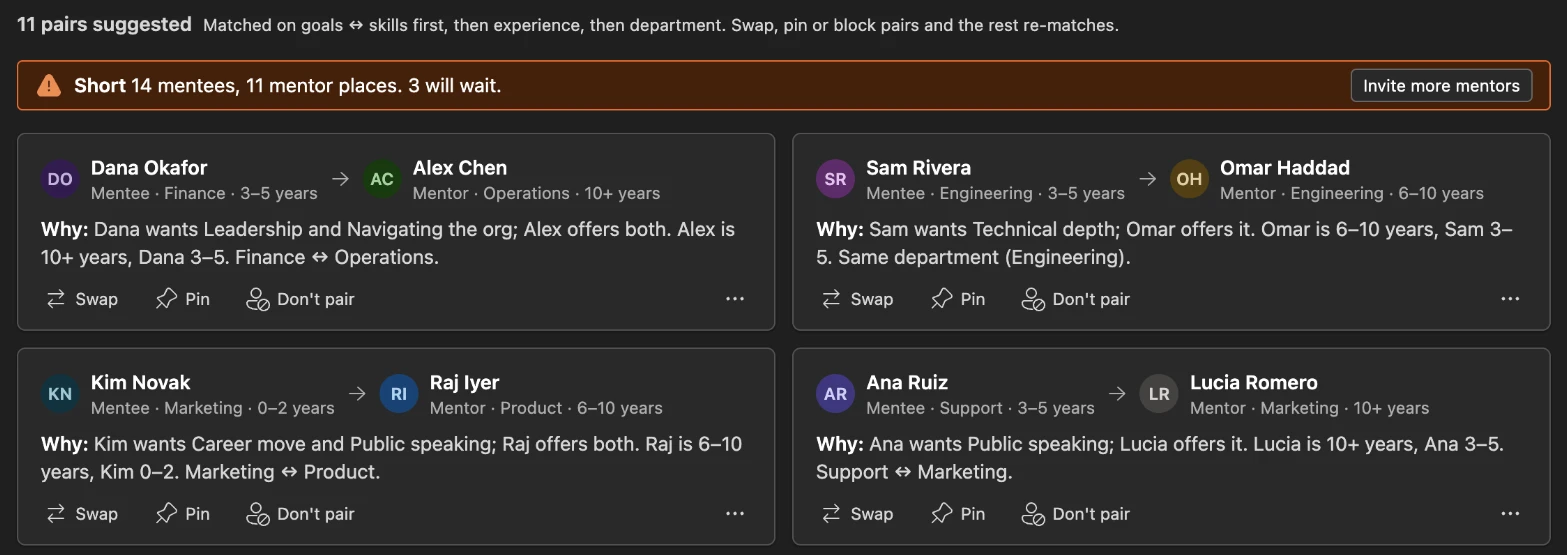
Suggested pairs, each with a reason
Goals are matched to skills, then experience, then a different department. Every pair shows why, so you can defend it. Swap, pin or block a pair; the rest re-matches.
Mentors say how many mentees they can take, and their places cap mentee sign-up. When you're short, you see it before launch, not after.
Kickoff
An intro that ends in a booked meeting
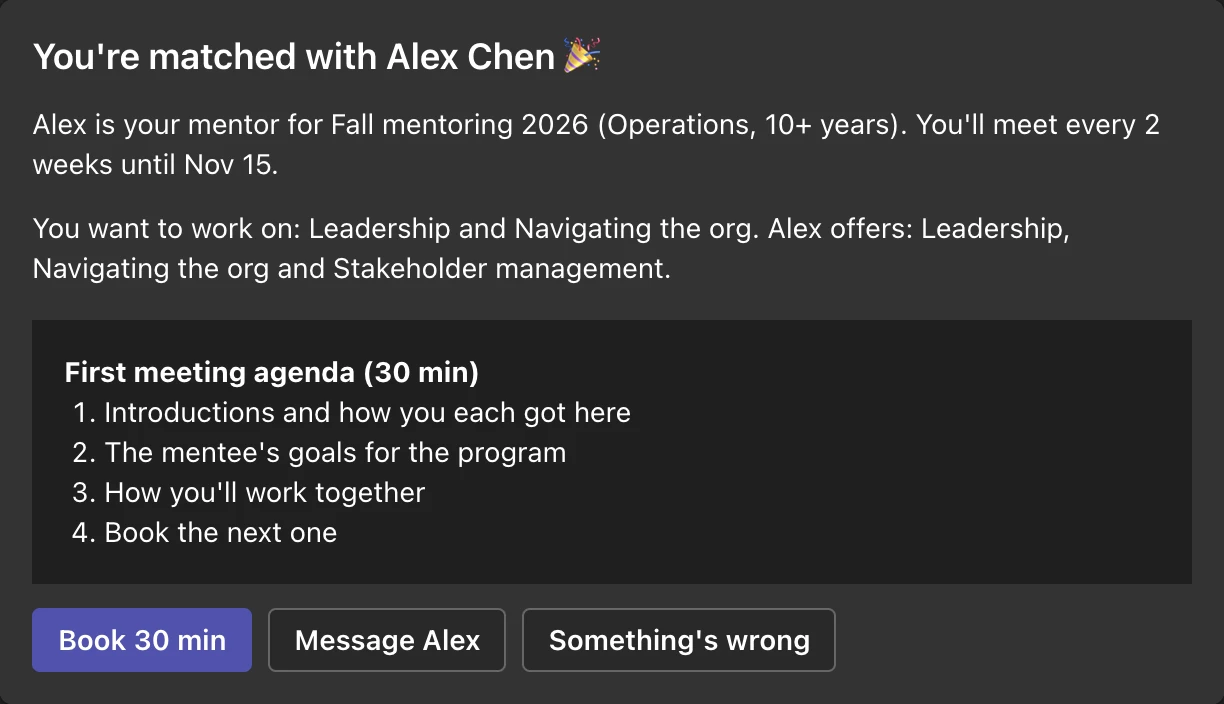
At launch each person gets a private intro in Teams chat, written from their side: who they're paired with, what they'll work on, and a first-meeting agenda.
"Book 30 min" opens a Teams meeting already addressed to their partner. Each later meeting gets the next agenda: goals, a live challenge, feedback, a stretch task.
Check-ins
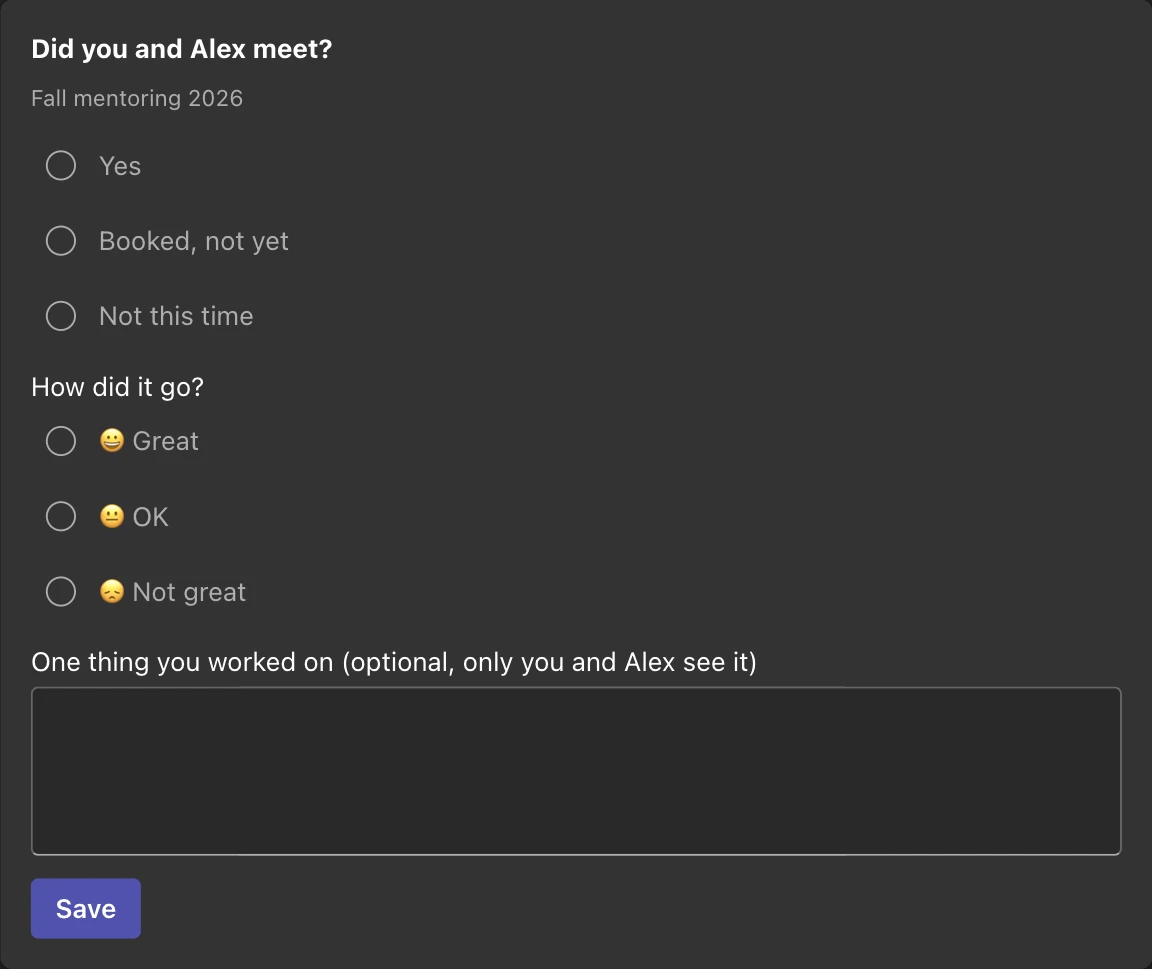
One question per meeting cycle
"Did you meet?" and a mood tap, answered in the chat. A note about what they worked on is optional and stays between the two of them.
With one approval from your Microsoft 365 admin, the app reads the date two people met from their calendars and stops asking. Nothing else from the calendar, ever.
Nudges
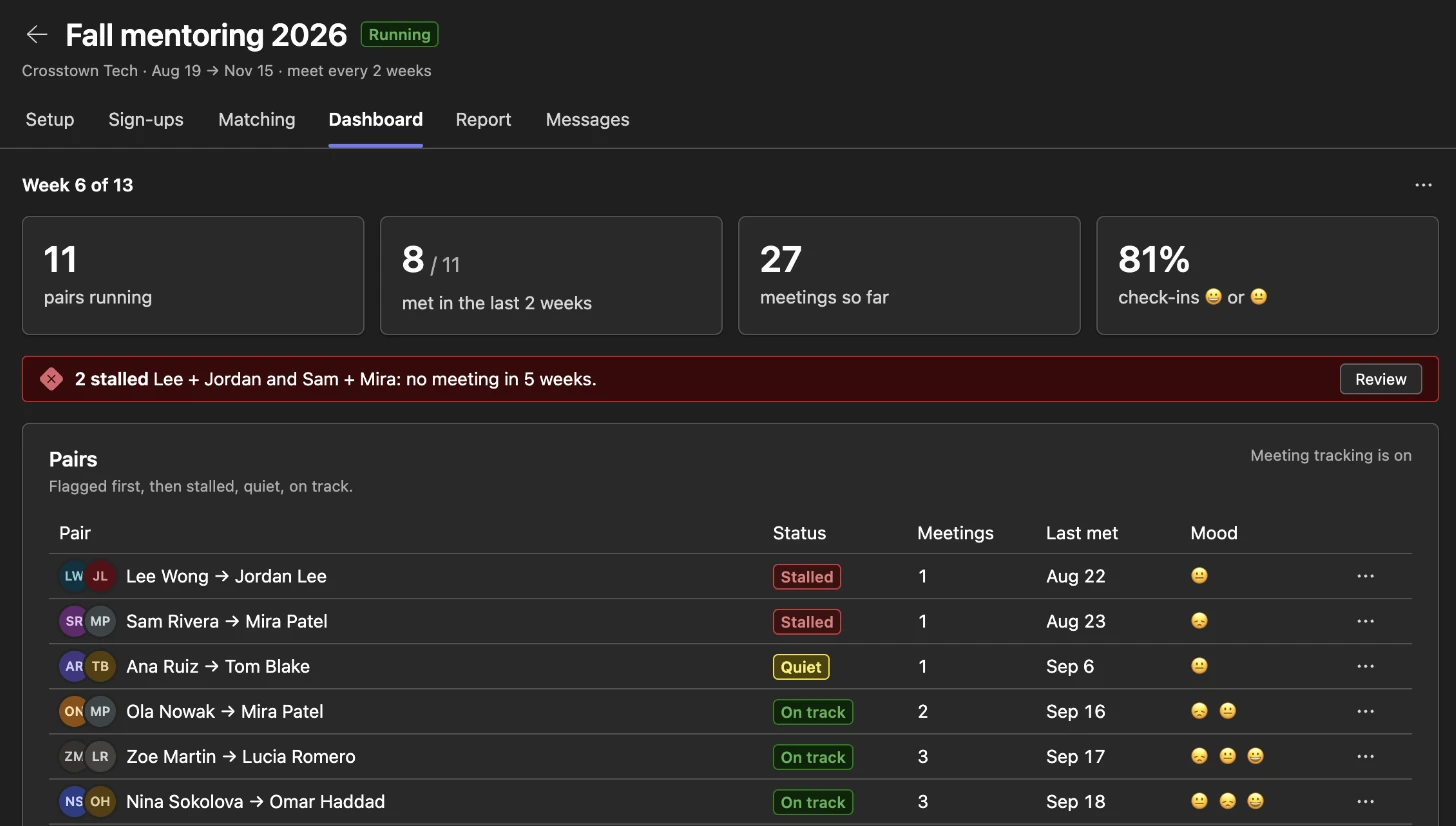
Quiet pairs get noticed
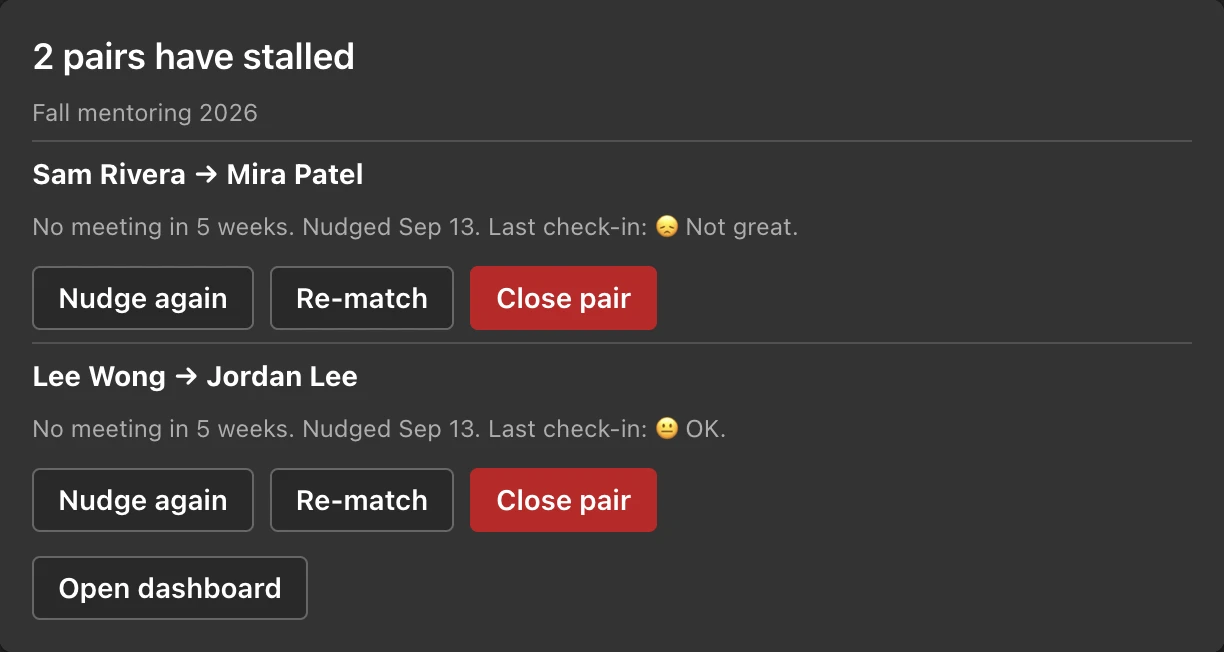
A pair that misses a cycle and a half gets a friendly nudge with the next agenda and a booking button. Still nothing after two and a half cycles, or two "not great" check-ins in a row, and the pair is flagged to you.
The alert says why and gives you three buttons: nudge again, re-match or close the pair.

Report
A report you can forward
At the end, a closing survey goes out and the report fills in: sign-ups, pairs, meetings per pair, mood over time, goal progress, and quotes people chose to share.
Goals asked for against skills offered is next program's recruiting brief: it shows where to find more mentors.
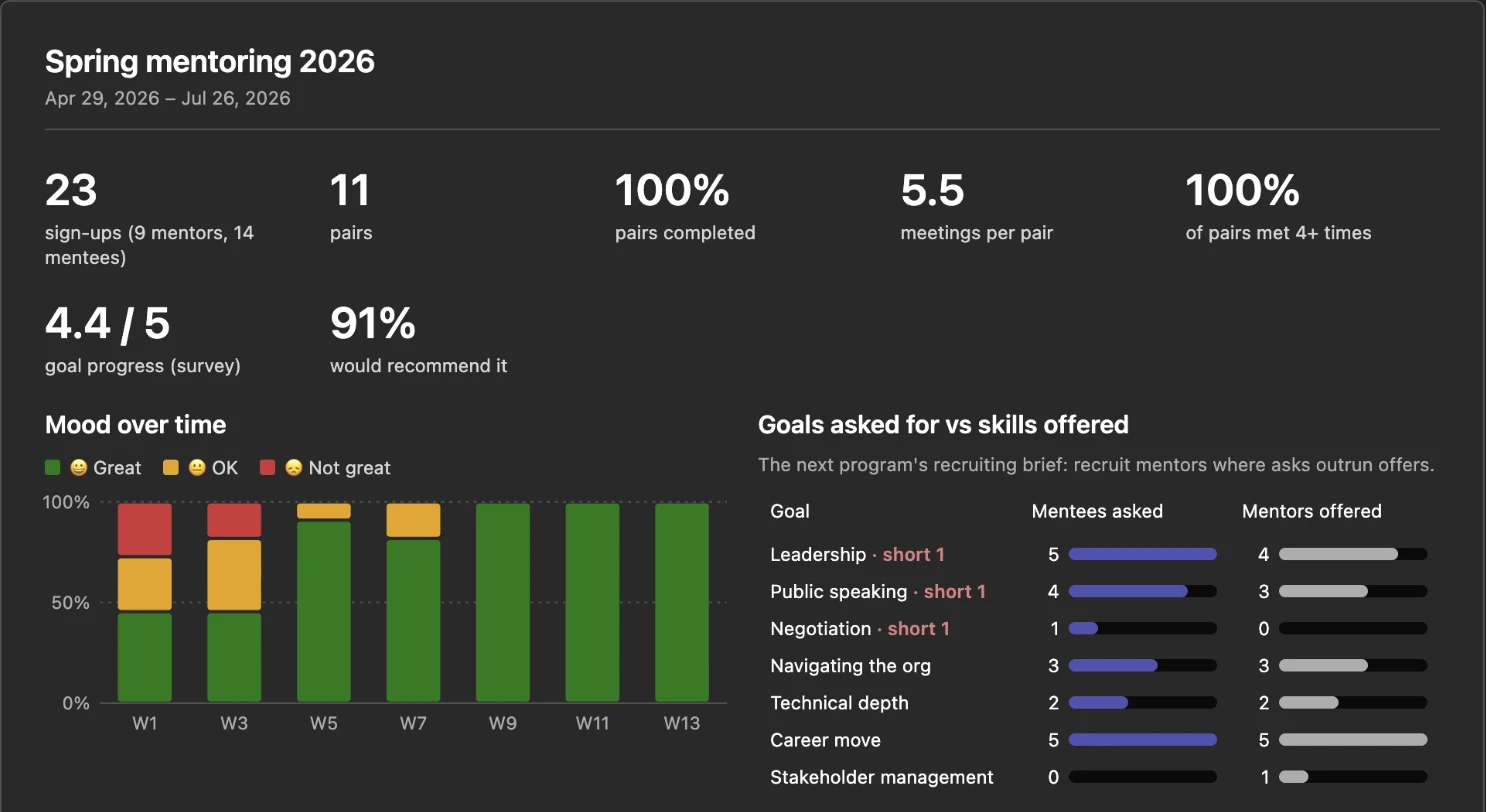
Screenshots: the app in Microsoft Teams, with sample names.
How a program runs
Set up in five minutes. The defaults work without editing anything.
- Add it to the teamOpen the Mentoring tab, pick 1:1 mentoring or Onboarding buddy, set the length and how often pairs meet: every week, every 2 weeks or monthly.
- RecruitMentors accept and say what they can help with. Then mentee sign-up opens with a channel post, capped at mentor places. The form is a card in Teams chat.
- Match and launchReview the suggested pairs, adjust a few, launch. Nothing is sent until you do. Each person gets a private intro.
- Watch it workThe dashboard shows who is meeting and who has stalled. At the end, a closing survey and the report.
Private by default
Every message is a private chat between one person and the bot. Nothing goes to a channel except the sign-up post.
Owners see progress, not conversations
Whether a pair met, and the mood tap. The note a pair writes about what they worked on is visible to the two of them only.
Participants control their data
Anyone can ask the bot "What do you have on me?" and see it all, or say "Delete me" to leave and erase it.
No admin permissions needed to start
Names and emails come from Teams; the sign-up card asks for department and experience rather than reading the directory. Full details.
Questions
How do I start a mentorship program at work with it?
Add Mentoring Programs to the Teams team your group already uses and open the Mentoring tab. Pick 1:1 mentoring or Onboarding buddy, set the length and how often pairs meet, and invite your mentors. The defaults work without editing anything. Once mentors have said yes, mentee sign-up opens with a post in the channel.
How does mentor matching work?
Each mentee's goals are matched to what mentors say they can help with, then a mentor with more experience is preferred, then someone from a different department (you can switch that to the same department, or ignore it). Mentors set how many mentees they take. The app suggests the best set of pairs for the whole group and shows a one-line reason for each. You can swap, pin or block a pair before launch.
Can it run an onboarding buddy program?
Yes. The Onboarding buddy template pairs new hires with buddies, meets weekly for three months by default, and gives each meeting its own agenda, from tools and introductions in week one to looking back in week twelve.
Do participants need to create an account?
No. Mentors and mentees only see private messages from the app's bot in Teams chat: a sign-up form, their intro, and a check-in each meeting cycle. They never visit a website or sign in. The program owner uses a tab in the team, signed in automatically through Teams.
How does it know whether a pair met?
By default it asks one question per meeting cycle: did you meet? If your Microsoft 365 administrator approves calendar access once, it reads the date two people met from their calendars instead and stops asking. It never reads meeting titles or descriptions and never writes to calendars.
Does it need IT or admin approval?
Running a program uses only the permissions a regular Microsoft 365 user and team owner already have. Your organization's Teams policy decides whether team owners can add apps themselves. Meeting tracking from calendars is the one part that needs an administrator, and the dashboard gives you a link to send them.
Where is the data stored?
Program data is stored in the United States and encrypted in transit. Organizations that need data kept in Canada can contact us before adding the app. Anyone in a program can ask the bot what it holds about them, or say "Delete me" to leave and erase it. Privacy details.
Run your next mentoring program in Teams
Tell us about your group and we'll get you set up.