
A strategic roadmap is the slide a board or exec team uses to decide where money and people go. Give it three to five themes as rows, the outcome each theme should deliver, quarters across the top with confidence falling as you go right, and the next decision written in the subtitle. Most strategic roadmap templates are a row of phase chevrons with no link to the work underneath. The template here opens as a theme-by-quarter grid with initiatives rolled up, and downloads as an editable PowerPoint slide.
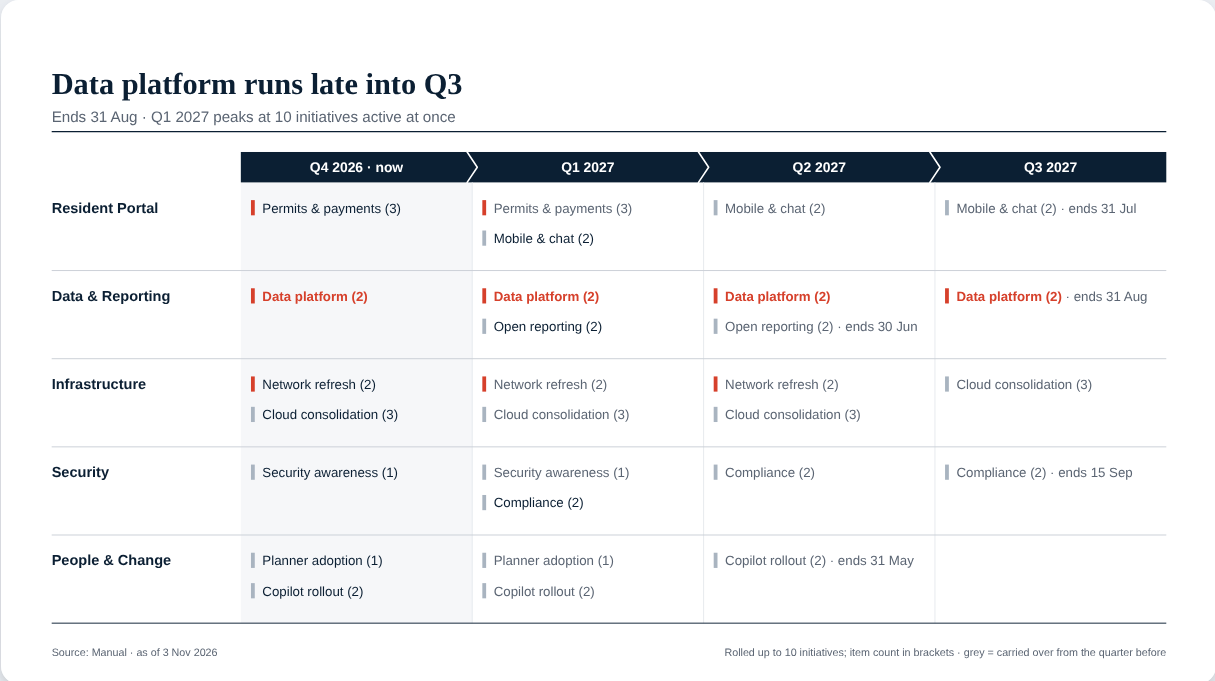
Open the template: edit it in the browser with no sign-in, and sign in only when you download.
What makes a roadmap strategic?
Its audience and its rows. A project roadmap helps a team deliver; a strategic roadmap helps leadership choose. That changes what goes on it:
- Rows are themes, the few areas the organization has chosen to invest in, not teams or projects.
- Each theme has an outcome: what will be true when it’s done, in words a board member would repeat.
- Initiatives sit under themes, rolled up. Tasks never appear.
- The time axis is coarse: quarters or halves, and less certain the further out it goes.
The gap between strategy and the work is old news. In their 2005 Harvard Business Review article The Office of Strategy Management, Robert Kaplan and David Norton cite a study of 1,854 large companies in which seven of eight failed to achieve profitable growth over a decade, “yet 90% of the companies in the study had developed detailed strategic plans with much higher targets.” A strategic roadmap is one of the cheapest ways to keep the plan tied to what is actually being worked on, as long as it’s built from the work rather than drawn beside it.
Who reads a strategic roadmap?
A board, an exec committee, sometimes investors or a council. They share three habits:
- They read the first slide and maybe nothing else. Put the story there: the headline, the themes, the next decision.
- They ask for years. A product leader in a 2026 r/ProductManagement thread, writing as a three-time CPO, said the CEO and board ask for multi-year roadmaps again and again, and that “a roadmap isn’t a promise.”
- They push back on vagueness. In another thread about a 3-to-5-year roadmap request, the author tried a Now/Next/Later board and leadership found it “too fluffy.” The top answer (78 points): “Do it by themes not individual work items.”
So the slide has to look concrete without pretending to know dates it can’t. Themes plus quarters plus a clear committed line does that.
Which themes go on the rows?
Three to five themes, each named for what it changes. “Resident portal” or “Data and reporting” work; “Digital” or “Excellence” don’t, because nobody can tell whether they’re on track.
A quick test for each theme:
- Can you write its outcome in one line? “Permits and payments online by spring 2027” passes. “Improve the customer experience” doesn’t.
- Does real work sit under it? If no initiative is funded under a theme, it’s an aspiration. Keep it off the slide or mark it as unfunded.
- Would cutting it change a budget line? If not, it’s probably part of another theme.
Keep the number of initiatives per theme small. Roman Pichler’s GO roadmap puts the goal at the centre and says to “limit the number of features for each goal to three, but do not state more than five.” The same cap works for initiatives under a strategic theme. Anything beyond it goes to a detail slide.
How far ahead: one, three or five years?
Show what you can stand behind, and say how sure you are. A useful pattern from the CPO thread above (27 points): “make a 1 year roadmap and update quarterly… Write on the roadmap that the current quarter is committed, other quarters are planned.”
For a strategic roadmap that becomes:
- This quarter: committed. Real initiatives with end dates.
- The next three to seven quarters: planned. Initiatives by quarter, expected to move.
- Year three and beyond: direction only. The theme names and the outcome you’re aiming at, with no bars.
The UK Government’s Service Manual puts the reason plainly: “The further into the future a mission will take place, the more uncertain it is.” It also asks that a roadmap carry “an explanation of who it’s for and how to read it,” and GDS revisits its own roadmaps at least quarterly. A strategic roadmap that hasn’t changed in a year is no longer describing the strategy.
The Roadmap Slides template works in quarters and fits up to eight on one slide, which covers the committed and planned parts. Year three belongs in the narrative: a line in the subtitle, or a Now Next Later slide where Later is the long-range direction.
Put the outcome on the slide
The grid shows where work sits. The board also wants to know what arrives when. The Outcomes version of the Quarters layout answers that: each initiative appears once, in the quarter it lands, tagged with its theme, and the footer says the dates are targets.
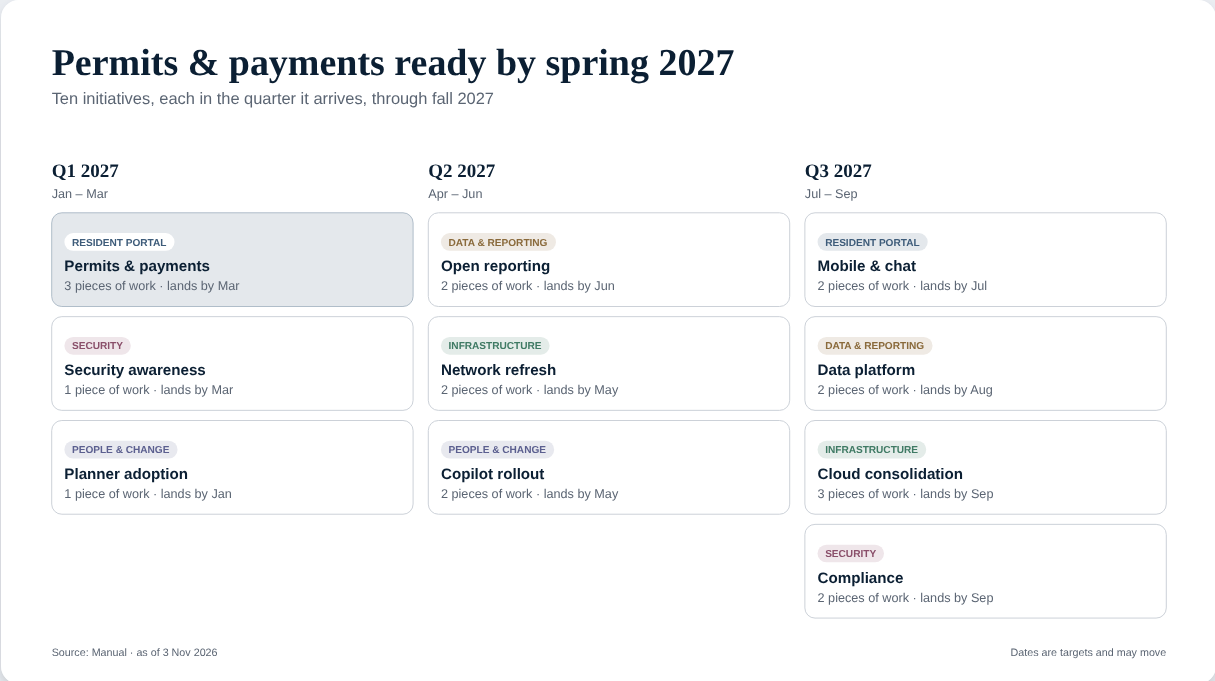
Write the headline as the outcome that matters most this year. “Permits and payments ready by spring 2027” tells a board member what to expect and when to ask about it; “Roadmap 2027” tells them nothing.
End on the next decision
A strategic roadmap goes to a board because the board has to decide something: fund a theme, move a date, stop an initiative. Say which decision it is in the subtitle, and show the decision dates on their own row.
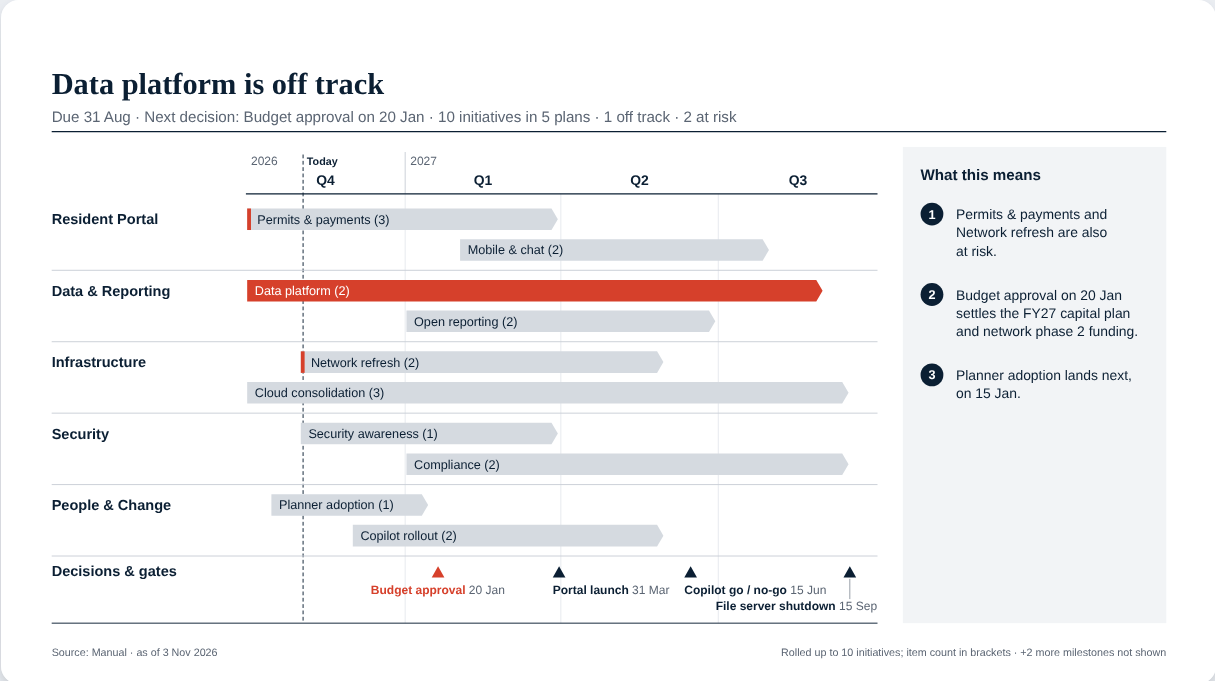
In the sample, the subtitle reads “Next decision: Budget approval on 20 Jan,” and the panel on the right says what that approval settles. The reader knows why the meeting exists before reading a single bar. The same data drives both slides: the Quarters grid for the strategy conversation, the Timeline when the question is what’s slipping.
Check the slide before it goes to the board
| Question a board member will ask | Where the answer should be |
|---|---|
| What are we betting on? | The row labels: three to five themes |
| What do we get, and when? | Initiatives by quarter; the headline names the biggest outcome |
| How sure are you? | A line saying the current quarter is committed and later ones are planned; “dates are targets” in the footer |
| What’s off track? | Status colour on the initiative, named in the title if it matters |
| What do you need from us? | The next decision in the subtitle and on the decisions row |
| How current is this? | The as-of date in the footer |
If a row on the table has no answer on your slide, that’s the edit to make before the meeting.
Build your strategic roadmap from the template
Roadmap Slides opens the template on sample data with five rows. To make it yours:
- Open the template and choose Edit the example.
- Rename the Plan column values to your themes, keeping One row per plan. Rows can also follow bucket, priority, status and other fields if your themes live there.
- Type your initiatives under each theme with start and due dates, and keep Roll up to initiatives on so the slide shows one bar per initiative.
- Pick the layout and variant: Quarters for the theme grid, Quarters with Outcomes for what lands when, Timeline for the decisions view. Set the quarters the slide covers, up to eight.
- Choose a look (Light, Colour, Warm paper or Dark) to match the board pack.
- Download for PowerPoint. Sign in here. Every bar and label is a native PowerPoint shape you can still edit, and a read-only share link is there for people who don’t need the file.
If the initiatives already live in Microsoft Planner (basic or premium), Jira or a spreadsheet, connect the source instead of typing, and the strategic roadmap stays current with the work. Building a roadmap from Microsoft Planner covers the Planner side, and mixing basic and premium plans in one portfolio covers the license question. Roadmap Slides is also on the Microsoft Marketplace.
For a platform view (what gets adopted, migrated and retired), see the technology roadmap template. For an IT department’s monthly project slide, a product team’s release view or a single project, use the IT, product or project roadmap templates.