
A Now Next Later roadmap replaces the calendar with three columns: Now is what the team is committed to and working on, Next is what’s shaped and queued, and Later is the problems you intend to tackle but haven’t committed to. Certainty falls from left to right, which is the whole point: the slide stops promising dates the team can’t stand behind. Below is what goes in each column, the choice between a rolling and a fixed version, when the format is the wrong one, and how to get it onto a PowerPoint slide from Microsoft Planner, Jira, a spreadsheet, or a list you type.
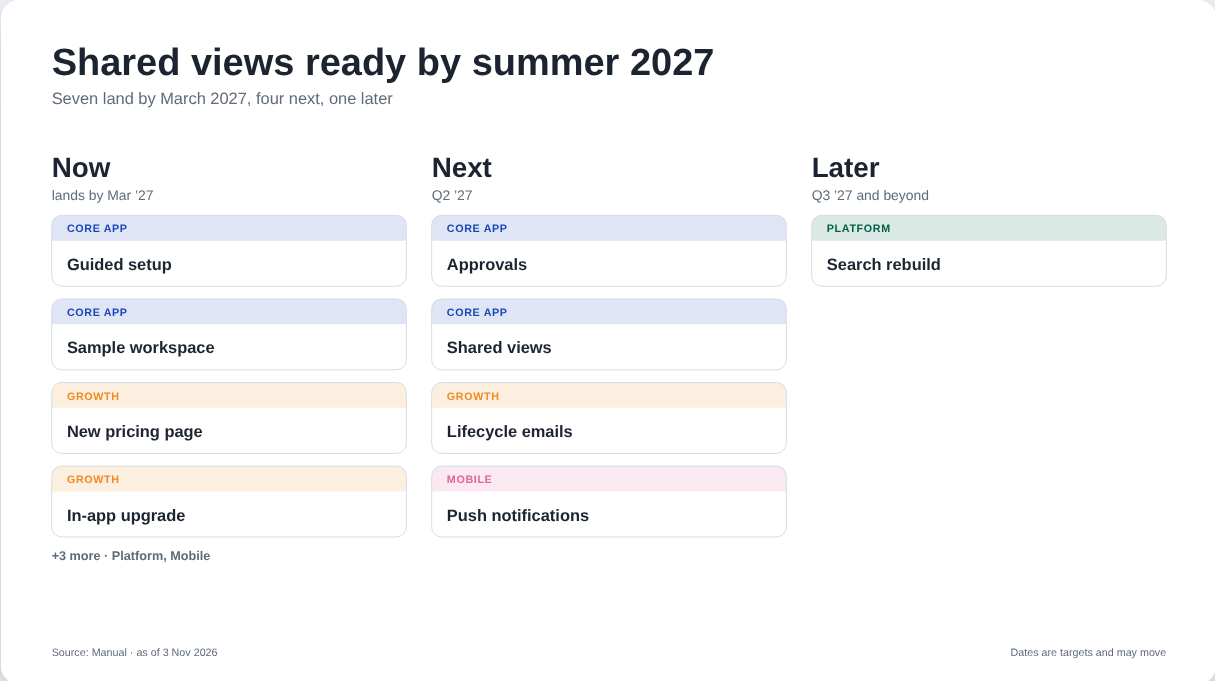
Try it on sample data: the product roadmap opens in the browser with no sign-in; pick Now Next Later under Layout.
What goes in each column?
Each column answers a different question, and the items in it should be written differently.
Now: what are we doing?
- Work that is committed, staffed and under way, or about to start.
- Specific enough that anyone on the team would describe it the same way: “Guided setup for new accounts”, not “Onboarding”.
- Few items. If Now holds more than the team can work on at once, it isn’t Now, it’s a wish list with a heading.
Next: what’s queued?
- Work that is understood and roughly sized, waiting for capacity in Now.
- Written as a problem plus the likely answer: “Approvals, so managers can sign off without email”.
- Expected to change. Moving an item out of Next is a normal outcome of learning, not a failure.
Later: what are we heading toward?
- Problems and bets, not features: “Search that finds documents by content”, not a spec.
- No dates, no estimates. Later is where ideas wait until they are understood well enough to move into Next.
- Short. A long Later column reads as a backlog dump and makes the whole slide look unprioritised.
The UK Government’s Service Manual describes the reasoning behind the shape: “The further into the future a mission will take place, the more uncertain it is. The closer it gets, the more you learn and the more confident you become about whether it’s the right thing to work on.” Three columns of falling detail say that visually.
Why teams pick it over a timeline
- It’s honest about uncertainty. A bar on a timeline in nine months’ time looks exactly as firm as a bar next week. In a Now Next Later slide, the column itself says how sure you are.
- It shows priority. The Service Manual asks that a good roadmap “shows what’s been done and what’s coming next in order of priority.” Left to right is that order.
- It’s cheap to keep current. Reviewing it means moving cards between three columns, not redrawing date bars.
- It keeps the conversation on outcomes. With no dates to argue about, the meeting tends to be about whether Later holds the right bets.
Rolling or fixed horizons?
The format can be read two ways, and the slide should make clear which one it uses.
| Rolling | Fixed | |
|---|---|---|
| What the columns mean | Relative to today: in progress, queued, later | Pinned to named periods, e.g. Now = H1 2027 |
| What happens next month | Some Next items move into Now; the slide always describes the present | The slide stays put until you move it on deliberately |
| Good for | A team’s working roadmap, a customer-facing “what’s coming” page | A board pack, an annual plan, a slide you’ll compare against later |
| Risk | Readers can’t tell when Later becomes Now | Starts to look like a timeline with fat columns |
Many teams land in between: rolling columns, with a rough horizon written under each heading (“this quarter”, “next quarter”, “later”) so readers get a sense of timing without bars. The sample slide above does that: lands by Mar ‘27, Q2 ‘27, Q3 ‘27 and beyond, with “Dates are targets and may move” in the footer.
Either way, put an as-of date on the slide. The Service Manual says GDS iterates its roadmaps “on at least a quarterly basis”; a Now Next Later slide that hasn’t changed in two quarters is describing the past.
When not to use Now Next Later
The format trades dates for honesty, so it’s the wrong pick when the audience needs the dates:
- A delivery with a fixed deadline: a contract milestone, a regulatory date, a launch event.
- A migration tied to a vendor’s end of support, where the date can’t move and everything else is planned back from it.
- A board or exec team approving spend by quarter. In an r/ProductManagement thread about a 3-to-5-year roadmap request, the author tried a Now/Next/Later board and leadership found it “too fluffy.”
- Dependencies across teams, where the point of the slide is to show that one piece has to land before another can start.
For those, use a timeline or a quarter grid. A common pairing is a Now Next Later slide for the team and the roadmap conversation, plus a quarter view in the leadership deck. The strategic roadmap template covers the themes-by-quarter version.
Check the slide before you present it
- Is Now small enough to be true? Count it against the people doing the work.
- Does every Now and Next item have one plain-language name? No ticket numbers, no internal codenames.
- Is Later short and written as problems?
- Does the title say the story? “Shared views ready by summer 2027” tells the reader what matters; “Roadmap” tells them nothing.
- Does the slide say how to read it? One line: whether the columns are rolling or pinned to periods, and that later items can change. The Service Manual asks for “an explanation of who it’s for and how to read it.”
- Is there an as-of date?
Make a Now Next Later slide from Planner, Jira or Excel
Drawing the three columns by hand in PowerPoint is quick the first time and tedious every review after that. Roadmap Slides draws the slide from wherever the work already lives and downloads it for PowerPoint.
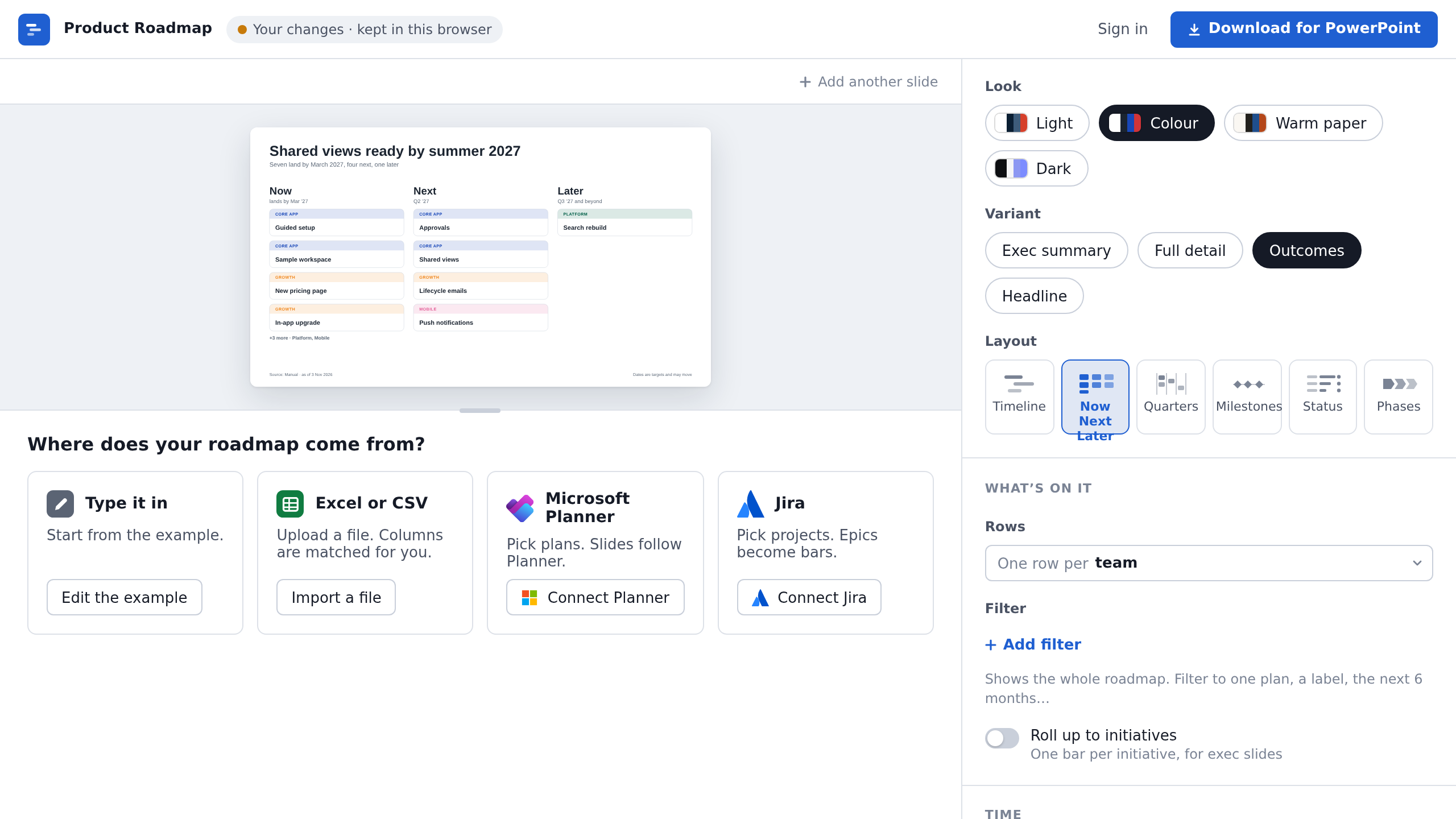
Where the items come from:
- Type it in: start from the example and edit the items in the browser.
- Excel or CSV: upload a file and the columns are matched for you.
- Microsoft Planner: pick plans, basic or premium, and the slide follows Planner.
- Jira: pick projects; epics become the items.
How it sorts the columns, so you know what you’re getting:
- Items go into a column by when they’re due, counted from the quarter you choose under Now starts: Now is work that lands within the first two quarters, Next is the third quarter, Later is anything after. So the items need due dates. Done items drop off.
- Rolling or fixed is a setting. Choose This quarter (or last/next quarter) and the columns move with the calendar, so next quarter’s deck shifts by itself. Choose a named quarter and the slide stays pinned to it.
- Cards carry their row label (team, plan, bucket or another field you pick under Rows), and a full column ends with a “+N more” line rather than shrinking the text.
- Variants change how much is shown: Exec summary, Full detail, Outcomes or Headline. Four looks (Light, Colour, Warm paper, Dark) match the deck you’re dropping it into.
To make one:
- Open the sample and pick Now Next Later under Layout.
- Choose a source: Edit the example, Import a file, Connect Planner or Connect Jira.
- Set Now starts to a moving quarter for a rolling roadmap, or a named quarter for a fixed one.
- Write the title as the outcome that matters most, and check the column contents against the list above.
- Download for PowerPoint. Signing in is needed here; the slide arrives as an editable PowerPoint file, and a read-only share link is there for people who only need to look.
The slide uses dates to place items, so it’s the “rough horizon under each heading” flavour of Now Next Later. If your team keeps Later deliberately dateless, give those items a far-out placeholder date so they land in Later, and say in the subtitle that Later is undated.
Related guides
- Building a roadmap from Microsoft Planner covers plans, buckets and labels as roadmap rows.
- Mixing basic and premium Planner plans in one portfolio covers the license question.
- The technology roadmap template is for platforms you adopt, migrate and retire; the strategic roadmap template is for a board’s themes by quarter.
- For a product team’s release timeline, use the product roadmap template.
Roadmap Slides is also on the Microsoft Marketplace.