
You’ve got a dozen things going at once — a product roadmap, a hiring round, a customer you’re trying not to lose, last quarter’s numbers. Right now that lives in scattered chat threads you have to dig through, or in your head. So when you ask an AI agent for help, it either knows nothing about your world, or you paste in everything and watch it get slower and vaguer the more you give it.
There’s a better setup, and it’s almost boringly simple: one file the agent always reads first, which points it to everything else. One entry point for all your work. From there the agent can reach any project you’ve got — but it only ever loads the slice it needs, so it stays sharp no matter how much you pile up.
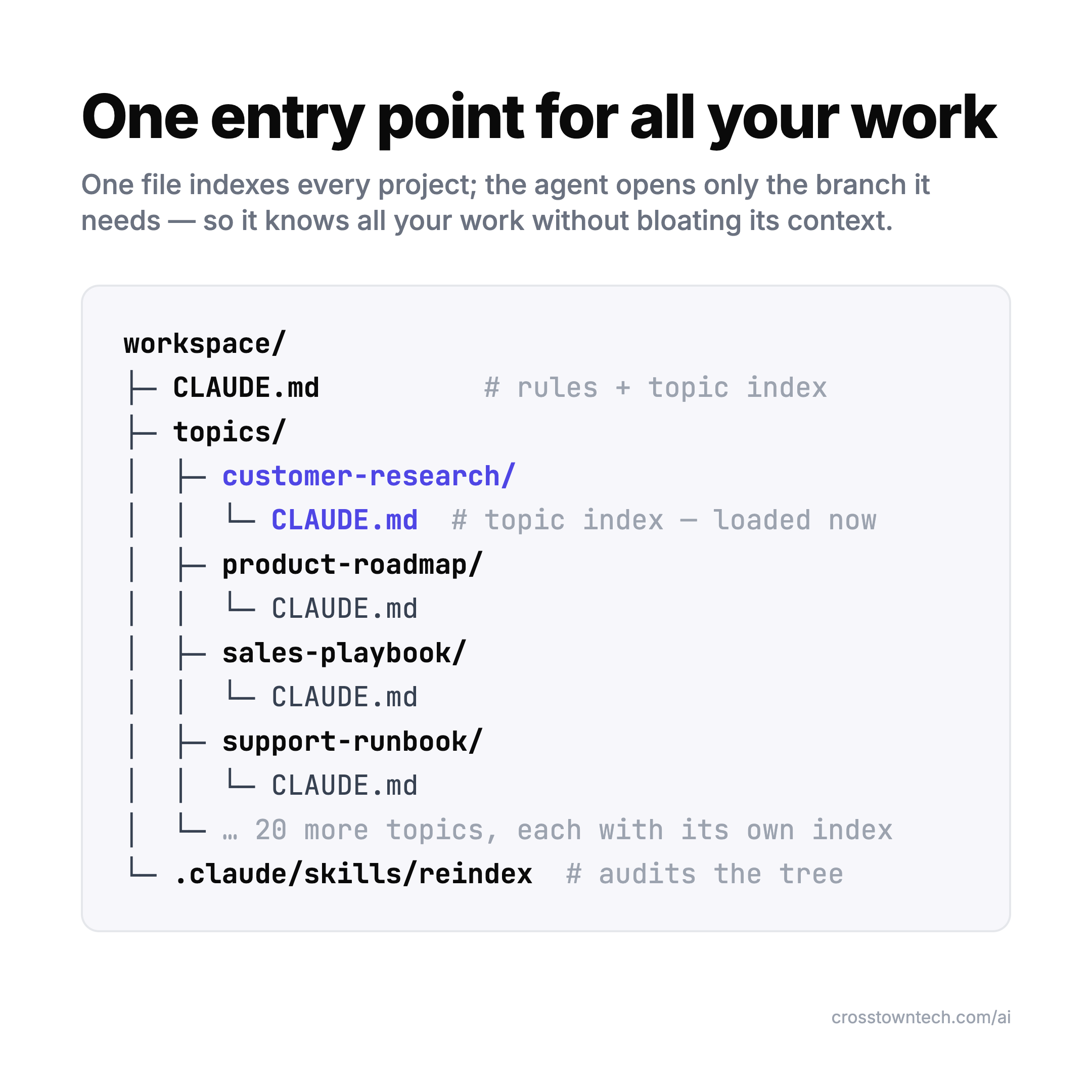
The folders aren’t the interesting part. The interesting part is what keeps this from turning into a mess the moment it gets big — and that’s the part almost nobody writes about.
What is an agent workspace?
An agent workspace is the environment an AI agent operates out of — the place that gives it the tools, memory, and context to actually do your work, not just chat about it. Agents are showing up everywhere now; Gartner expects 40% of enterprise apps to ship a task-specific agent in 2026, up from under 5% in 2025 (Gartner, 2025). Which makes the question worth answering plainly: where does the agent actually live, and what does it know when it gets there?
The industry mostly uses “agent workspace” for a whole platform — vector-database memory, an orchestration layer, connectors, the lot (Inkeep, 2026). My version is stripped to the bone: a folder of plain files, a root index the agent reads first, and one index per project it routes through. No platform, no database. Something you can stand up this afternoon and still be running in a year — because the thing that makes a workspace work isn’t the memory tech, it’s the routing.
What counts as one — and what doesn’t. The test is simple: does the agent have a persistent, navigable map of your work that it routes through, or does it start cold every time? An IDE gives an agent your code but not your customers, your roadmap, or last quarter’s numbers. A chat UI gives it a conversation that evaporates when the thread ends. A RAG app gives it search over a pile of documents, but no standing instructions and no sense of what’s a live project versus an archive. Even a fully wired-up data setup — the three ways to get your company’s data to an AI — solves reach, not orientation. An agent workspace is the layer that ties those together and stays put: one entry point, a routed structure underneath, and rules for keeping it clean. Tools and memory are table stakes now; the workspace is what makes them navigable once you have more than a toy’s worth.
Why does an AI assistant get worse the more you give it?
Because of a failure mode researchers now call context rot: models get less accurate as the input gets longer — well before you hit any size limit. Chroma tested 18 frontier models and every one of them degraded as the context filled up, losing 30%+ accuracy on information buried in the middle (Chroma, Context Rot, 2025). It’s the same “lost in the middle” effect first measured back in 2023: accuracy is highest for what’s at the very start or end of the context and sags everywhere in between (Liu et al., 2023).
So “just give the model everything” is a trap. A 200K-token window doesn’t mean you should fill it. The more of your workspace you dump in, the dumber the agent gets at the one thing you actually asked about.
Isn’t a “second brain” or LLM wiki the fix?
It’s the start of one. The pattern of keeping your knowledge as plain markdown an LLM can read and maintain — Andrej Karpathy’s LLM Wiki is the cleanest version — is genuinely good, and there are now a dozen “build a second brain with Claude” guides riffing on it.
But most of them show you the toy: a couple of folders, a single instructions file, six notes. That works for a weekend. The question they skip is the one that actually matters: what happens when it’s big? When you’ve got two dozen live projects and thousands of notes, dumping that into context brings back the exact rot we just described. A pile of markdown is still a pile.
The fix isn’t a better pile. It’s the difference between a knowledge base — somewhere you store things to look up later — and an operating system — something that routes the agent to the right slice of live work and keeps the rest out of the way. The second one needs a little structure the first one doesn’t.
What actually keeps it from rotting?
Three pieces. None of them are fancy.
1. A root file with the rules. One file at the top (CLAUDE.md, if you’re in Claude Code) that the agent reads every session. It holds two things: an index of every project, and the rules for maintenance — when to read a project, when to write into it, when to start a new one. This is the agent’s standing instruction set. It’s small on purpose.
2. One index per project. Every project gets its own folder with its own short index file. The root points to the projects; each project’s index points to its own files. So orientation is two hops — root → the one project that matters — and the agent never has to hold the whole workspace in its head to find anything.
3. An audit that runs on a schedule. Structure rots if nothing enforces it. A single “reindex” pass that checks every project’s index against what’s actually in its folder, flags drift, and tidies it up is what keeps year-two as clean as week-one. This is the step the toy versions don’t have, and it’s why they don’t survive scale.
That’s the whole governance layer. A constitution at the top, an index in every room, and a janitor that does rounds. Put those three together and you’ve got what I call an Agent Workspace — not a pile of notes, but a place your agent can actually operate out of.
What does the agent actually load?
Only what the task needs. Point it at something and it reads the root index, routes to the one project that matters, opens a handful of files, and gets to work. Everything else stays out of its context.
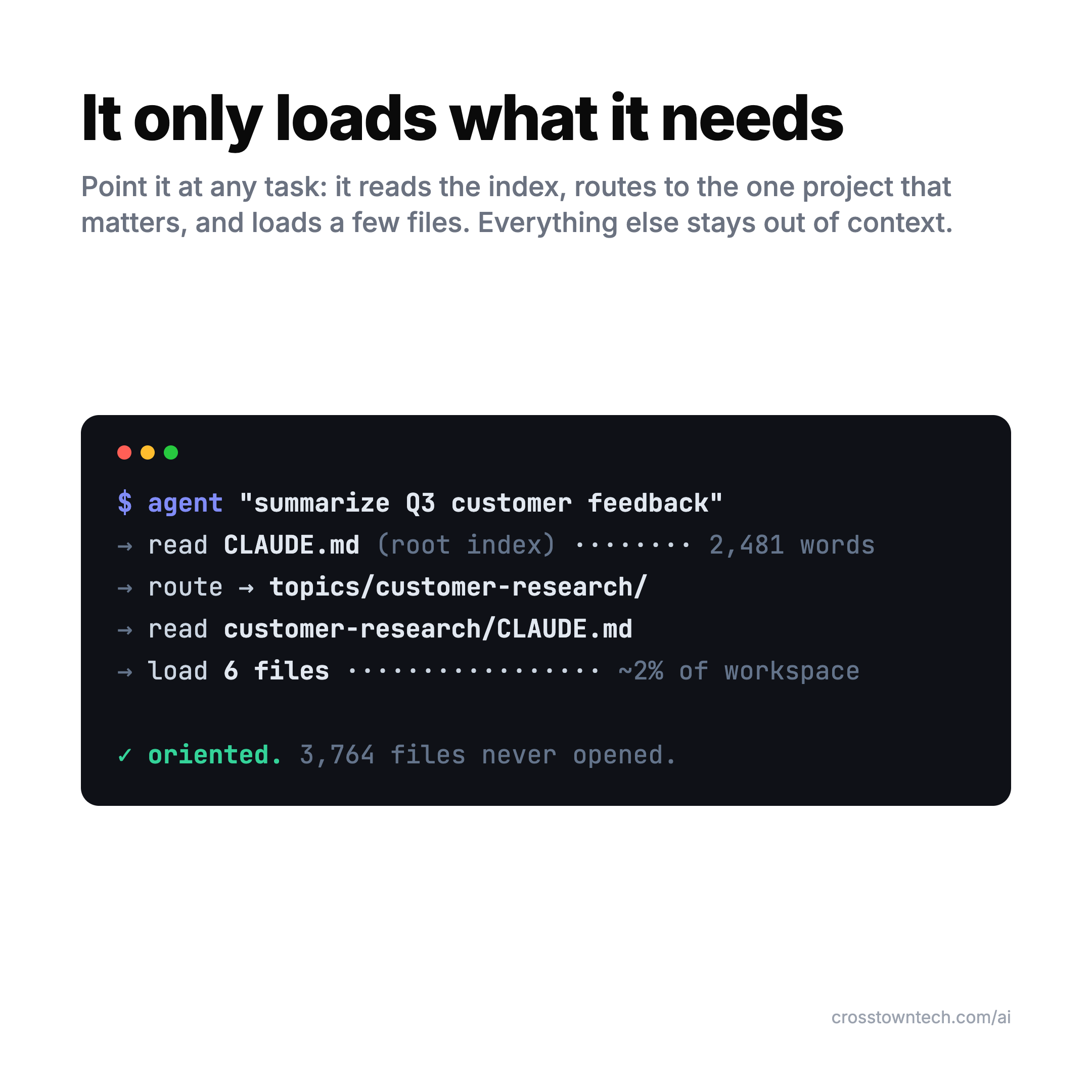
This isn’t a hack — it’s exactly the pattern Anthropic describes as good practice. Claude Code drops the root instructions in upfront, then uses search to pull in specific files just in time, at runtime, instead of preloading everything. The whole goal, in their words, is to “optimize the signal-to-noise ratio” of what’s in the context (Anthropic, Effective context engineering for AI agents, 2025). The index-per-project layout is just a clean way to make that routing obvious. The agent loads a couple of percent of everything you’ve got — and that number barely moves as the workspace grows.
How do you set this up for a team?
The same way, one shared workspace instead of a personal one. Each area of the business — customer research, the roadmap, the sales playbook, the support runbook — is a project folder with its own index. New person or new agent shows up, reads the root file, and is oriented in minutes without anyone explaining where things live. Everyone — and every agent — works off the same grounding, and it doesn’t drift because the audit keeps it honest.
This is where the whole thing earns its keep. Context engineering — deciding what the agent knows at the moment it acts — is moving from a niche trick to standard practice fast; Gartner expects it in 80% of AI tools by 2028, with a 30%+ accuracy lift where it’s done well (via Atlan, 2026). A routed, self-maintaining workspace is the simplest version of that you can actually run today. On a small team it does more than tidy files — it’s the setup that quietly absorbs the admin seat you couldn’t afford to hire. And unlike most AI experiments, the payoff is the kind you can actually put a number on: fewer re-explanations, faster orientation, less rework from an agent that lost the plot.
Start with three rules
You don’t need the full thing to feel the difference. Add these to your agent’s root file this week:
- Index, don’t dump. The root file lists projects and points to them. It never holds the projects’ contents.
- Every project carries its own index. When a folder gets its own work, it gets its own short index file the agent reads before the rest.
- Audit on a cadence. Once a week (or once a sprint), have the agent check every index against its folder and fix the drift.
Do that and your agent stops getting dumber as you give it more — which, once you’ve felt it, is hard to give up.
FAQ
What is an agent workspace? The environment an AI agent operates out of — the setup that gives it the tools, memory, and context to do your work, not just chat about it. The heavy version is a platform with vector-database memory and orchestration; the lightweight version is a folder of plain files with a root index the agent reads first and one index per project it routes through, so it reaches everything while only loading the slice it needs.
What counts as an agent workspace, and what doesn’t? The test is whether the agent has a persistent, navigable map of your work, or starts cold every session. An IDE gives it your code but not your customers. A chat UI forgets when the thread ends. A RAG app searches a pile of documents but has no standing rules and no sense of what’s live. A workspace ties those together and stays put: one entry point, a routed structure, and an audit that keeps it clean.
Do I need a special platform to have one? No. A folder of markdown, a root index for the rules, one index per project, and a scheduled audit is a working agent workspace today. Platforms add managed memory and orchestration, but the core move — route to the right slice, keep the rest out of context — works over plain files.
I packaged the whole thing — the root rules, the project structure, and the audit skill — as a forkable repo called Agent Workspace. Copy it, point your own agent at it, delete the example projects, and add your own: github.com/kvirolainen/agent-workspace.